%20MA%20.png?width=2550&height=208&name=NHMC%20Header%202023%20(2550%20%C3%97%20208%20px)%20MA%20.png)
Introduction:
Email aliases in HubSpot allow you to send emails from different email addresses associated with your account. This is useful for managing multiple brands, departments, or roles within your organization.
Steps to follow:
- Navigate to Settings:
- Click on the "Settings" icon (gear icon) located in the main navigation bar.

- Click on the "Settings" icon (gear icon) located in the main navigation bar.
- Go to General Settings:
- In the left sidebar menu of the settings page, select "General."
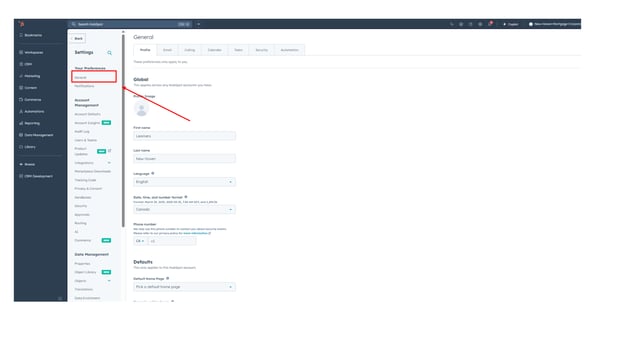
- In the left sidebar menu of the settings page, select "General."
- Click on Email Settings:
- Within the General settings, click on the "Email" tab.

- Within the General settings, click on the "Email" tab.
- Add Email Aliases:
- Locate and click on the "Add email aliases" button.
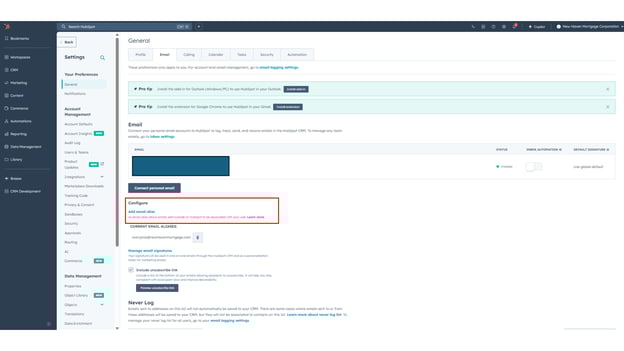
- Locate and click on the "Add email aliases" button.
- Enter Email Alias and Save:
- A pop-up box will appear.

- A pop-up box will appear.
-
- Enter the desired email alias in the provided field.
- Click the "Save" button to confirm.

Verify Saved Alias:
The newly added email alias will now be displayed in the list of email aliases below.
